Plugply, the job application form and careers page for your Framer site
CV upload, jobs synced to the Framer CMS, every application in one place. Recruit from your Framer site, installed in 3 minutes with the Plugply Plugin.
No credit card. Then €19/month excl. VAT, no commitment.
- Plugply Plugin
- Jobs in the CMS
- Form on the page
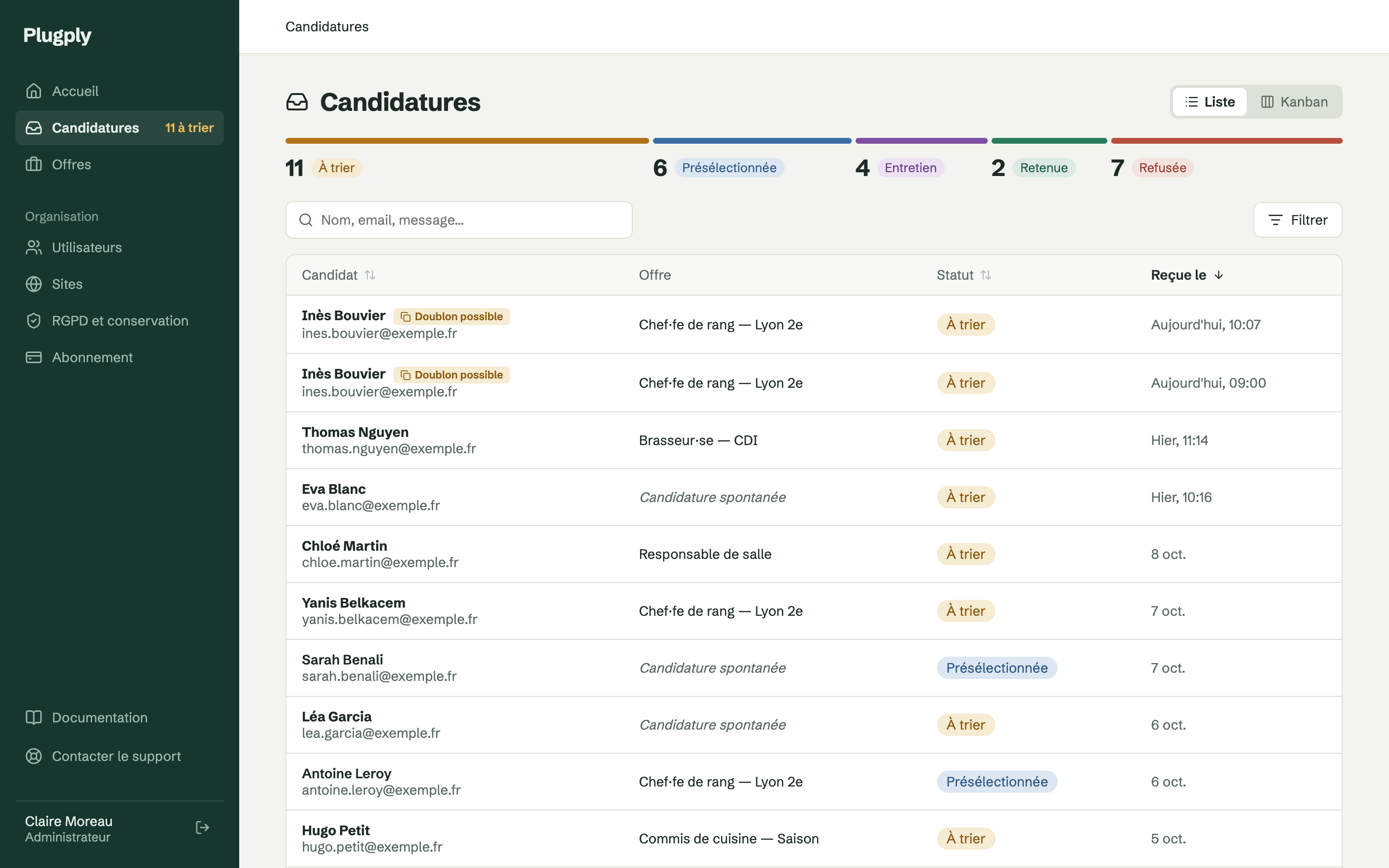
Plugply completes Framer so you can recruit straight from your website
Framer builds beautiful websites, but its built-in form does not accept files and stores nothing. To recruit, you need to receive CVs, keep them safe and sort them: that is what Plugply does.
- CV and cover letter upload
- PDF or Word, scanned by an antivirus, stored in France. Candidates don't need to create an account.
- Your job board right inside Framer
- Title, location, contract type, description and publication date arrive in a read-only Framer CMS collection. You lay out your jobs like the rest of your site.
- Each application linked to its job
- On each job page, the form knows which position the candidate is applying for. Elsewhere, candidates choose the position or send an open application.
- Seamlessly integrated into your site
- Title, colours, corner radius: the form adapts to your Framer site's branding.
- Applications managed outside your inbox
- Applications arrive in Plugply: statuses, Kanban, CV preview, automatic deletion at the end of the retention period you choose.
- No more forwarding CVs by email
- The whole team works on the same applications: shared notes, up-to-date statuses, a history of every action. No need to forward a CV to get someone's opinion.
Install the Framer Plugin in 3 steps
The full documentation is available in your Plugply account once you sign up.
Connect your site
In Plugply, add your Framer site and paste the key you get into the Plugin in Framer.
Sync your jobs
In the Framer CMS, add a collection and choose Plugply: your published jobs arrive there directly.
Insert the form
From the Plugin, insert the application form on a job page, then publish your site.
€19/month excl. VAT, Plugin included
One price per company (€22.80 incl. VAT), with unlimited jobs and applications. 14-day trial with no credit card, then cancel at any time.
Questions about the Framer Plugin
Can Framer's built-in form receive CVs?
No: it does not accept file uploads. The Plugply form receives the CV and cover letter (PDF or Word, up to 10 MB) and stores them with the application.
Can Google see my job listings?
Yes. The Plugin copies your jobs into a Framer CMS collection: each job becomes a real page of your website, with its own URL, indexed by search engines like the rest of your pages.
Do I need to republish my site after editing a job?
Yes, as with any Framer CMS content: sync from the collection, then publish the site. In the meantime, an archived job stays visible, but its form submits the application as an open application or shows that the position has been filled.
Do CVs go through Framer?
No. The form sends files straight from the candidate's browser to our storage in France. Framer only displays the form.
Can I customise the form to match my site?
Yes, from Framer's right-hand panel: language (English, French, German, Spanish, Italian or Dutch, or the page's language), title, accent colour, text, border and background colours, corner radius, and links to your privacy policy and your jobs page.
Can I place the form outside a job page?
Yes. With no linked job, for example on a “Join us” page, candidates choose the position from your published jobs, or send an open application if you accept them.
Start recruiting from your Framer site
14 days free, no credit card required. Then €19 excl. VAT a month, no commitment.